
Your domain belongs to you, not to the company you bought it from. If renewals got expensive, support is slow, or you simply want your domain and hosting in one place, you can move it to another registrar. The process takes about 5–7 days, mostly waiting, and your website and email can keep working the whole time.
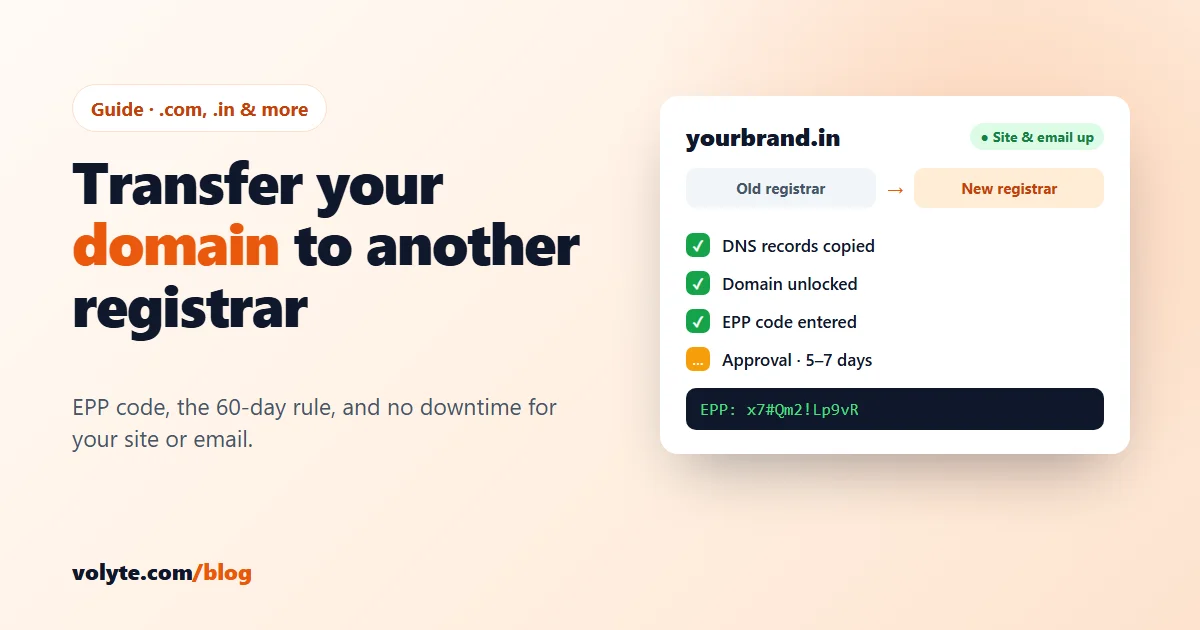
Short version: check the domain is more than 60 days old → copy your DNS records → unlock it → get the EPP code → start the transfer at the new registrar → approve it → check everything and lock it again.
Before you start: 4 checks
- 60 days since registration or the last transfer. For .com, .net, .org and other generic domains, ICANN's Transfer Policy lets a registrar refuse a transfer within 60 days of registration or of a previous transfer. Many registrars also lock a domain for 60 days after the owner's name or organisation changes. Brand-new domain? Wait until day 61.
- Not about to expire. Transfer with at least 2–3 weeks left before expiry. If the domain has already expired, renew it at the current registrar first — transferring an expired domain is unreliable and can cost you the domain.
- An email you can read. Approval messages go to the owner's email on the domain. If it is an old address, update it at your current registrar before you start.
- Where your DNS lives. This is what decides whether your website goes down — see the next step.
1. Copy your DNS records first (this prevents downtime)
Look at your domain's nameservers at the current registrar:
- Nameservers point to your hosting, Cloudflare or another DNS service? Nothing changes during the transfer — they stay the same, and your site and email keep working.
- Using the registrar's own free DNS? That DNS often stops when the domain leaves. Write down every record first — A, CNAME, MX, TXT (SPF, DKIM, verification records) — and recreate them at your new DNS provider, or point the nameservers to your hosting before the transfer.
You can check the current records from any computer:
nslookup -type=NS yourdomain.com
nslookup -type=MX yourdomain.com
nslookup -type=TXT yourdomain.com
MX and TXT records are the ones people forget — and forgetting them is why "my email stopped" after a transfer. New to DNS? Our guide to pointing your domain to your VPS explains each record type.
2. Unlock the domain
Most registrars switch on a transfer lock (it shows as clientTransferProhibited in WHOIS). In your registrar's domain settings, turn off Registrar Lock, Transfer Lock or Domain Lock — the name varies. If WHOIS privacy is on, you can usually leave it; some registrars ask you to switch it off for the transfer.
3. Get the EPP / auth code
The EPP code (also called auth code, authorisation code or transfer key) is a password that proves you own the domain. Find Get EPP code or Authorisation code in the domain settings, or ask support. Under ICANN rules, a registrar that doesn't offer this in its control panel must give you the code within 5 calendar days, and it cannot hold the code back because of a payment dispute. For .in domains, NIXI (the .in registry) says registrars are contractually required to give the code when the owner asks.
Copy the code exactly — it is case-sensitive and often contains symbols.
4. Start the transfer at the new registrar
Enter the domain name on the new registrar's transfer page, paste the EPP code and pay. For .com and most generic domains, the transfer fee includes one more year: the new year is added to your current expiry date, so you lose no time you already paid for (the total can't go beyond 10 years). At Volyte, start on the domain transfer page.
5. Approve it — then wait
You may get an email from the new registrar, the old one, or both. Approve or accept the transfer from the links in those emails. Your old registrar may also show an Accept / Reject transfer option in its panel — accepting it there can finish the transfer the same day.
Otherwise, it completes on its own: for generic domains, if the old registrar doesn't reply within 5 days the transfer is approved automatically, and for .in domains NIXI says a transfer completes in five 24-hour periods once it starts. So plan for 5–7 days in total.
6. After the transfer: 5 minutes of checks
- Check WHOIS shows the new registrar and the new expiry date.
- Open your website and send a test email to and from your domain address.
- Lock the domain again at the new registrar, and turn on auto-renew.
- Change the EPP code if your new registrar lets you — NIXI recommends this for .in domains.
- Check the owner email is correct at the new registrar, so renewal reminders reach you.
Transferring a .in domain
.in is India's country domain, run by NIXI, and its steps are the same: get the auth code from your current registrar (6–16 characters), give it to the new registrar, and the transfer completes in five 24-hour periods. Some rules differ from .com — for example, a domain under a dispute stays locked until the dispute and its appeal period are over. Your new registrar shows any extra year and the price at checkout.
Why a transfer gets refused
- Less than 60 days since registration or the last transfer (generic domains).
- The domain is still locked, or the EPP code was mistyped or has been changed.
- The domain has expired, or the old registrar has a hold for unpaid fees.
- A dispute or court order involves the domain.
The error message from the new registrar usually says which one. Fix it and start the transfer again.
A note on what's coming: ICANN is updating the Transfer Policy for generic domains. The proposed changes include a shorter 30-day lock and a one-time transfer code that expires after 14 days. Until the new rules take effect, the 60-day rules above apply.
Moving your domain to Volyte
Start a domain transfer, paste your EPP code and approve the email — our team can check your DNS with you first so your site and email don't go down, and helps at every step, 24/7, in Hindi and English. Need hosting too? Web hosting starts at ₹99/month, and the price you pay is the price you renew at. And if you ever want to leave, it works the same way in reverse: it's your domain, and you get your EPP code when you ask for it.
Frequently asked questions
How long does a domain transfer take?
Usually 5 to 7 days. The old registrar has up to 5 days to respond, after which the transfer is approved automatically. If you accept the transfer at your old registrar, it can finish the same day. .in transfers complete in five 24-hour periods once started.
Will my website or email go down during the transfer?
Not if your DNS stays the same. If your nameservers point to your hosting or a DNS service like Cloudflare, nothing changes. If you use the old registrar's free DNS, copy all your records — including MX and TXT — to a new DNS provider before you start.
What is an EPP code?
The EPP code, also called an auth code or authorisation code, is a password that proves you own the domain. You get it from your current registrar and give it to the new one to start the transfer. It is case-sensitive.
Can I transfer a domain I registered recently?
For .com and other generic domains, a registrar can refuse a transfer within 60 days of registration or of a previous transfer, so wait until the 60 days have passed. Many registrars also apply a 60-day lock after the owner details change.
Does transferring a domain add a year?
For .com and most generic domains, yes. The transfer fee includes one year, which is added to your current expiry date, up to a maximum of 10 years. You don't lose the time you already paid for. Your new registrar shows the details for other domains at checkout.